Manual · Chapter 2
Getting started
From installation to the first controlled document. This chapter is deliberately short — and will grow with the guided setup wizard we are currently building.
All screenshots show sample data from Berger Präzisionsteile GmbH — a fictitious company (CNC precision manufacturing, 12 people) used to show every easo feature honestly, open gaps included.
Install and launch
easo is available for download — signed and verified. On first launch you connect easo to the place your QMS will live: a repository of your own that belongs to you and moves with you. A guided wizard that handles this step with no prior knowledge — pick a folder, enter your company name, done — is in the works; this chapter will then be extended step by step. Why easo builds on Git under the hood while you never see any of it is explained in A QMS on plain Git — honestly assessed.
The first document
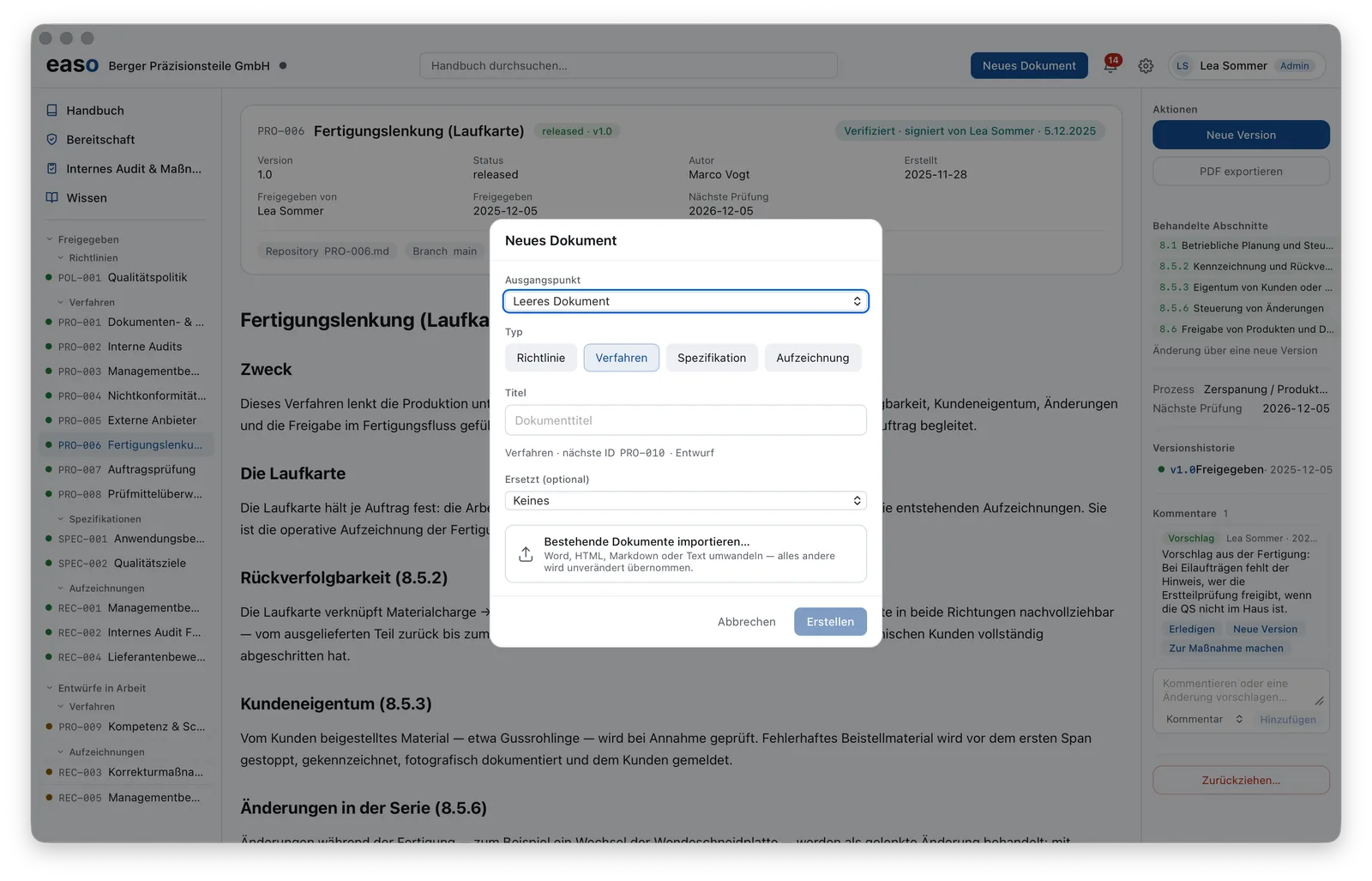
New document asks for exactly what's needed: the type (policy, procedure,
specification or record) and a title. easo assigns the ID itself — the next procedure is
automatically something like PRO-010 and starts as a draft. Optionally, the new
document supersedes an existing one or starts straight from an import.
Already running a QMS in Word, PDF or another tool? Then don't start here — start in Import & migration: your existing documents come first.